
This article is new for Identity Manager 5.3.
This article explains how Identity Manager (IDM) integrates with Digital Access (DA) to perform FIDO2 credential provisioning on behalf of a user.
Through this integration, IDM can register and manage credentials directly in Digital Access without requiring the end user to register the credential manually in DA.
Prerequisites
-
Identity Manager 5.3.0 or later versions.
-
Digital Access 6.11 or later versions.
-
Hermod 4.2 or later versions.
-
Smart ID Desktop App 2.4 or later versions.
Register a credential in Digital Access from an IDM process
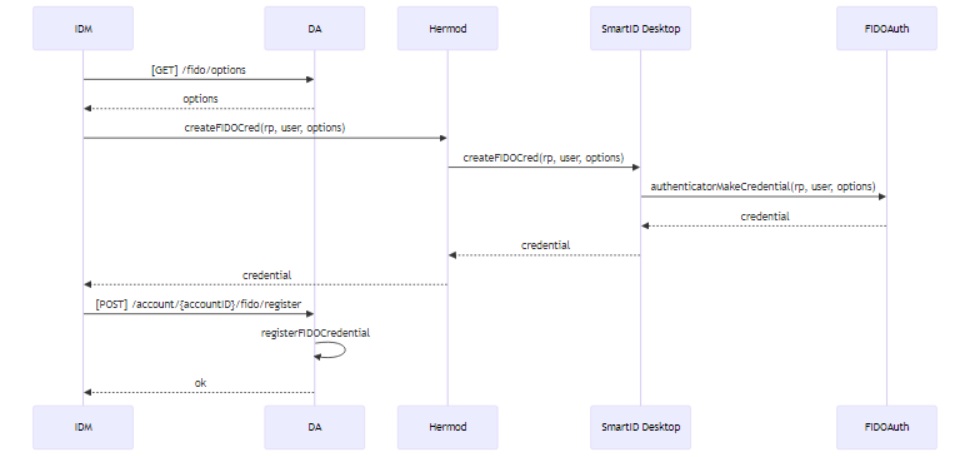
The integration between IDM and Digital Access uses a two-step FIDO2 provisioning flow:
-
Request credential creation options for a given user —
GET /fido/options -
Submit the generated credential back to DA for registration —
POST /fido/credentials
Once the credential is stored, it becomes available for authentication and device verification within Digital Access.
The diagram below shows the Digital Access FIDO credential provisioning flow with Identity Manager:
Demo process
A typical IDM process for Digital Access FIDO registration includes these steps:
-
Get credential creation options from Digital Access
IDM callsGET /fido/optionsto obtain a challenge and relying-party metadata for the target user. -
Generate the credential using Smart ID Desktop App
Smart ID Desktop App receives the creation options and performs the credential registration locally, producing an attestation response. -
Store the credential in Digital Access
IDM callsPOST /fido/credentialswith the resulting credential data to complete the registration and bind it to the user’s DA account.
Process execution notes
-
The plugout URL form is used to trigger communication with Smart ID Desktop App on the client.
-
A parallel service task requests the credential creation from Smart ID Desktop App and runs in the background while the form is shown to the user.
-
Both parallel executions merge and the process continues once the credential creation is completed and the user proceeds in the form.
Ensure that the service task “Hermod: Fido – Create Credential” is configured with the Async option enabled.
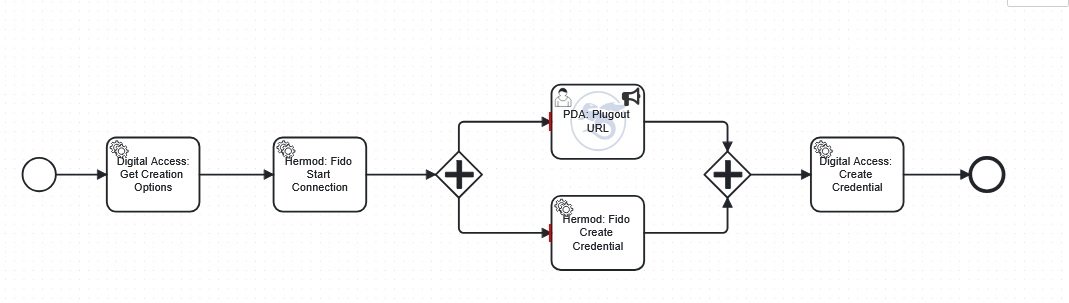
This demo process is just a simple example. Make sure to add error handling to make it usable in a customer project.
Links to service tasks
-
“Desktop App: Fido - Start Connection” in Smart ID Messaging - Standard service tasks in Identity Manager
-
“Desktop App: Fido - Create Credential” in Smart ID Messaging - Standard service tasks in Identity Manager
-
Digital Access: Fido – Get Creation Options in Credentials - Standard service tasks in Identity Manager
-
Digital Access: Fido – Create Credential in Credentials - Standard service tasks in Identity Manager